7 Best 3D Terrain Rendering Options That Transform Digital Maps
Creating stunning 3D terrain visualizations has never been more accessible thanks to powerful rendering tools that transform flat maps into immersive landscapes. Whether you’re developing games, creating architectural presentations, or building virtual environments, choosing the right terrain rendering solution can make or break your project’s visual impact.
The landscape of 3D terrain tools spans from beginner-friendly options to professional-grade software that handles complex geological data and realistic environmental effects. You’ll find solutions that cater to different skill levels, budgets, and project requirements.
Disclosure: As an Amazon Associate, this site earns from qualifying purchases. Thank you!
Understanding 3D Terrain Rendering and Its Applications
Building on the foundation of available terrain rendering solutions, you’ll need to grasp the core concepts and practical applications that make these tools valuable for professional work.
P.S. check out Udemy’s GIS, Mapping & Remote Sensing courses on sale here…
[lasso id=”16024″]
What Is 3D Terrain Rendering
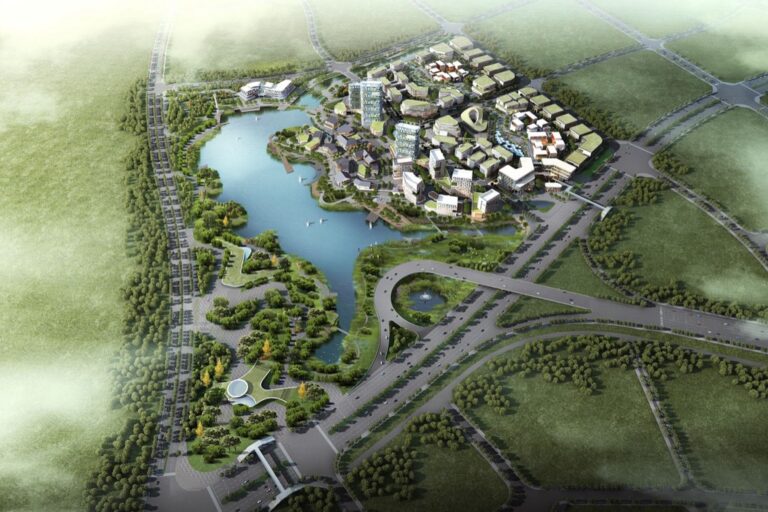
3D terrain rendering transforms elevation data into three-dimensional landscape visualizations using specialized algorithms and graphics processing techniques. You input digital elevation models (DEMs), satellite imagery, and geographic data to create realistic terrain surfaces with accurate topographic features. The process involves mesh generation, texture mapping, and lighting calculations that produce photorealistic or stylized landscape representations. Modern rendering engines utilize GPU acceleration to handle complex terrain datasets efficiently, enabling real-time interaction with large-scale geographic areas.
Key Features to Look for in Terrain Rendering Software
High-resolution DEM support ensures your terrain maintains accuracy at various zoom levels and detail requirements. Look for multi-format compatibility that handles GeoTIFF, ASCII, and LAS point cloud data seamlessly. Real-time editing capabilities allow you to modify elevation profiles, add vegetation, and adjust atmospheric conditions during the design process. Advanced shader systems provide customizable material properties for rock formations, water bodies, and vegetation coverage. Export functionality should include standard formats like OBJ, FBX, and game engine compatibility for your specific workflow needs.
Industries That Benefit From 3D Terrain Visualization
Urban planning departments use terrain rendering to assess development impact on natural landscapes and flood risk analysis. Film and gaming studios create believable virtual environments for entertainment productions requiring geographic accuracy. Environmental consulting firms visualize watershed analysis, erosion patterns, and habitat modeling for regulatory compliance projects. Architecture and engineering companies integrate terrain models with building designs to demonstrate site integration and environmental impact. Military and defense contractors utilize tactical terrain analysis for mission planning and training simulation environments.
Blender: Open-Source Powerhouse for Terrain Creation
Blender transforms terrain visualization with professional-grade tools that rival expensive commercial software. You’ll find comprehensive sculpting capabilities and advanced material systems that create photorealistic landscapes without licensing costs.
Advanced Sculpting and Displacement Tools
Blender’s sculpting workspace offers dynamic topology for organic terrain shaping and displacement modifiers that convert height maps into detailed elevation models. You can use the multires modifier to add progressive detail levels while maintaining performance optimization. The dynamic paint system lets you blend terrain features like erosion patterns, vegetation boundaries, and weathering effects. Real-time feedback ensures precise control over terrain mesh density and surface complexity throughout your workflow.
Node-Based Material System for Realistic Landscapes
Blender’s Shader Editor provides procedural texture generation through mathematical nodes that create realistic rock formations, soil variations, and vegetation transitions. You’ll access built-in noise patterns like Voronoi and Perlin for natural surface irregularities and color ramp nodes for elevation-based material blending. The Principled BSDF shader handles physically accurate lighting calculations while the ColorRamp node system enables automatic texture distribution based on slope angles and height values.
Community Resources and Add-Ons
Blender’s terrain community offers specialized add-ons like A.N.T. Landscape for procedural generation and Real Snow for atmospheric effects. You can download free height maps from NASA SRTM data through community-developed importers and access thousands of PBR materials from sites like Poly Haven. The BlenderGIS add-on imports real-world elevation data while community tutorials provide step-by-step terrain workflows for specific geographic regions and landscape types.
Unity 3D: Game Engine Excellence for Interactive Terrains
Unity 3D stands out as a leading choice for creating interactive 3D terrain environments with robust real-time capabilities. You’ll find its comprehensive terrain system designed specifically for game development and immersive applications.
Built-In Terrain System and Heightmap Support
Unity’s terrain system directly imports heightmaps from various sources including raw files, grayscale images, and DEM data formats. You can sculpt terrain using built-in brushes that modify elevation data in real-time while maintaining optimized performance. The system automatically generates collision meshes and supports texture painting with up to 32 different surface materials per terrain tile for realistic landscape variety.
Real-Time Rendering Capabilities
Unity delivers exceptional real-time terrain rendering through its Universal Render Pipeline (URP) and High Definition Render Pipeline (HDRP) systems. You’ll achieve 60+ FPS performance on modern hardware while rendering large-scale terrains with dynamic lighting and shadow casting. The engine optimizes draw calls through level-of-detail (LOD) systems that automatically reduce polygon density based on camera distance and viewing angles.
Asset Store Integration for Enhanced Features
Unity’s Asset Store provides hundreds of terrain enhancement tools including Gaia for procedural world generation and MapMagic for node-based terrain creation. You can access professional add-ons like World Creator integration for importing complex landscape data and CTS (Complete Terrain Shader) for advanced material blending. These third-party solutions extend Unity’s capabilities with features like erosion simulation, vegetation placement systems, and photorealistic material libraries.
Unreal Engine: Cinematic Quality Terrain Rendering
Unreal Engine delivers film-quality visuals through its advanced landscape system designed for cinematic productions and AAA game development. You’ll find industry-leading tools that create breathtaking terrain environments with photorealistic detail.
World Composition for Large-Scale Environments
World Composition lets you build massive terrains spanning hundreds of square kilometers without performance compromises. You’ll import multiple heightmaps that automatically tile together seamlessly while streaming terrain sections based on camera proximity. This system handles world-scale projects like open-world games and architectural visualizations where you need vast landscapes with consistent visual quality across different viewing distances.
Landscape Material Editor
Landscape Material Editor provides node-based control over terrain textures with up to 16 different material layers per landscape. You’ll blend materials using height-based masks, slope calculations, and custom painting tools to achieve realistic surface variation. The system supports advanced features like tessellation for geometric detail and parallax mapping for depth illusion, letting you create photorealistic rock faces and detailed ground surfaces.
Foliage and Vegetation Systems
Foliage systems automatically populate your terrain with millions of grass instances, trees, and vegetation using procedural placement rules. You’ll control density based on terrain slope, material type, and custom masks while maintaining smooth performance through instanced rendering. The Foliage Tool supports wind animation, seasonal variation, and LOD systems that adjust vegetation complexity based on distance for optimal frame rates.
World Machine: Professional Terrain Generation Software
World Machine stands as the industry standard for procedural terrain generation, delivering Hollywood-quality landscapes through its node-based workflow system. You’ll find this powerful software in studios creating blockbuster films and AAA games requiring realistic terrain foundations.
Procedural Workflow for Natural Landscapes
World Machine’s node-based system lets you create expansive terrains through mathematical algorithms rather than manual sculpting. You’ll connect generators, filters, and combiners to build complex landscape features like mountain ranges, valleys, and plateaus. The software’s procedural approach means you can modify parameters at any stage and watch your entire terrain update automatically. This workflow proves invaluable when clients request terrain variations or when you need to generate multiple landscape versions quickly.
Advanced Erosion and Weathering Effects
You’ll achieve photorealistic terrain surfaces using World Machine’s sophisticated erosion algorithms that simulate millions of years of natural weathering. The thermal erosion device creates realistic cliff faces and scree slopes, while hydraulic erosion carves convincing river valleys and sediment deposits. Coastal erosion effects generate authentic shoreline features, and you can layer multiple erosion types to create complex geological formations. These effects transform basic heightmaps into believable landscapes that pass cinematic scrutiny.
High-Resolution Output Capabilities
World Machine handles massive terrain datasets up to 16K resolution and beyond, supporting the demanding requirements of film and game production. You’ll export heightmaps, normal maps, and texture masks in industry-standard formats like OpenEXR and TIFF. The software’s tiled rendering system processes enormous terrains by breaking them into manageable chunks, allowing you to create continent-sized landscapes without memory limitations. Professional licenses unlock unlimited resolution output, making World Machine suitable for IMAX productions and high-end architectural visualizations.
Houdini: Procedural Powerhouse for Complex Terrains
Houdini stands out as the most sophisticated option for creating complex 3D terrain environments. Its procedural workflow enables unlimited terrain variations through mathematical precision.
Node-Based Procedural Generation
Houdini’s node-based architecture lets you build intricate terrain systems using interconnected operations. You’ll create landscapes by connecting height field nodes that generate elevation data mathematically. The software’s VEX scripting language gives you precise control over terrain algorithms. You can easily modify any parameter upstream to instantly regenerate your entire terrain system. This approach produces consistent results across multiple terrain variations while maintaining complete editorial control.
Advanced Simulation and Physics Integration
Houdini excels at integrating realistic physics simulations directly into your terrain creation process. You’ll simulate water erosion patterns that carve realistic valleys and riverbeds into your landscapes. The software’s particle systems create natural debris flows and sediment deposits. You can simulate wind erosion effects that shape realistic dune formations and rock weathering. These physics-based tools produce scientifically accurate terrain features that surpass traditional sculpting methods.
Industry-Standard Pipeline Integration
Houdini integrates seamlessly with professional production pipelines through its robust export capabilities. You’ll export terrains to Unreal Engine, Unity, and Maya using optimized mesh formats. The software supports industry-standard file formats like OpenEXR for displacement maps and Alembic for animated sequences. You can create custom HDAs (Houdini Digital Assets) that other team members use without requiring full Houdini licenses. This pipeline flexibility makes Houdini essential for large-scale productions requiring consistent terrain workflows.
Vue: Specialized Software for Natural Environment Creation
Vue stands out as the premier choice for creating photorealistic natural environments with its dedicated focus on landscape visualization. This specialized software transforms basic terrain into stunning ecosystems through advanced vegetation systems and atmospheric rendering.
EcoSystem Technology for Vegetation Placement
Vue’s EcoSystem technology revolutionizes vegetation placement by automatically distributing plants across your terrain based on realistic parameters. You’ll control density, species variation, and growth patterns through advanced algorithms that simulate real-world botanical behavior. The system intelligently adapts vegetation placement to slope angles, elevation zones, and soil conditions. EcoSystem creates natural-looking forests and grasslands without manual placement, saving hours of tedious work while maintaining organic authenticity.
Atmospheric and Lighting Effects
Vue’s atmospheric engine produces Hollywood-quality lighting and weather effects that bring your terrain to life. You’ll create volumetric clouds, realistic fog distribution, and dynamic sky systems that change throughout the day. The software simulates accurate light scattering through atmosphere and haze, producing authentic color temperature variations. Advanced features include procedural cloud generation, realistic precipitation effects, and atmospheric perspective that adds depth to distant mountains and valleys.
Integration With Popular 3D Applications
Vue seamlessly connects with industry-standard 3D software through comprehensive export options and direct integration plugins. You’ll export terrains to Maya, 3ds Max, Cinema 4D, and Blender using optimized mesh formats that preserve detail levels. The software supports standard file formats including OBJ, FBX, and Collada for maximum compatibility. Vue’s PlantFactory integration allows you to create custom vegetation models that work across multiple 3D applications, ensuring consistent quality in your production pipeline.
Terragen: Photorealistic Landscape Rendering Solution
Terragen stands as the definitive choice for creating cinematic-quality landscape visualizations with unparalleled realism. You’ll find this software powering Hollywood productions and architectural presentations where photographic accuracy matters most.
Physically-Based Atmosphere and Lighting
Terragen’s physically-based rendering engine accurately simulates real-world atmospheric conditions through scientifically-grounded calculations. You’ll achieve authentic lighting scenarios using Rayleigh and Mie scattering algorithms that replicate how light interacts with atmospheric particles. The software calculates sun angles, atmospheric density, and light wavelengths to produce naturally-occurring color variations throughout different times of day. Advanced volumetric lighting effects create realistic god rays and atmospheric haze that enhance your terrain’s visual depth and authenticity.
Advanced Cloud and Sky Systems
Terragen’s cloud system generates volumetric formations using fluid dynamics simulations for unprecedented realism in sky rendering. You’ll control cloud density, altitude layers, and weather patterns through intuitive parameters that maintain scientific accuracy. The software supports multiple cloud types including cumulus, stratus, and cirrus formations with realistic light scattering properties. Dynamic sky variations respond to atmospheric conditions, creating natural-looking weather systems that complement your terrain geometry and enhance the overall environmental storytelling.
Professional Animation Capabilities
Terragen delivers professional-grade animation tools for creating time-lapse sequences and camera movements across your rendered landscapes. You’ll animate atmospheric conditions, lighting changes, and weather patterns using keyframe controls that maintain consistency throughout long sequences. The software supports camera path animation with smooth interpolation for cinematic fly-throughs and establishing shots. Batch rendering capabilities handle complex animation sequences efficiently, making Terragen suitable for film production timelines and high-resolution output requirements.
Conclusion
Your journey into 3D terrain rendering doesn’t have to be overwhelming with these seven powerful options at your disposal. Whether you’re working on a tight budget with Blender or pushing cinematic boundaries with Terragen each tool offers unique strengths that can transform your creative vision into stunning reality.
The key lies in matching your specific needs with the right software capabilities. Consider your project scope technical requirements and long-term goals when making your choice. Remember that mastering any of these tools takes time but the investment pays off through professional-quality results.
Start with the option that aligns best with your current skill level and project demands. You can always expand your toolkit as your expertise grows and projects become more complex.
Frequently Asked Questions
What is 3D terrain rendering?
3D terrain rendering is the process of transforming elevation data into three-dimensional landscape visualizations using specialized algorithms and graphics processing techniques. It creates realistic terrain surfaces through mesh generation, texture mapping, and lighting calculations, allowing users to convert flat maps into engaging, interactive landscapes for various applications.
Which industries benefit from 3D terrain visualization?
Multiple industries utilize 3D terrain visualization including urban planning for city development, film and gaming for entertainment content, environmental consulting for impact assessments, architecture and engineering for project presentations, and military applications for strategic planning. These tools help professionals visualize geographic data effectively.
Is Blender good for creating 3D terrain?
Yes, Blender is excellent for terrain creation. This open-source software offers professional-grade sculpting tools, advanced material systems, and displacement modifiers that rival expensive commercial alternatives. With community add-ons and procedural generation tools, Blender provides comprehensive terrain creation capabilities without licensing costs.
What makes Unity 3D suitable for terrain development?
Unity 3D excels in creating interactive terrain environments with its built-in terrain system supporting heightmap imports and real-time sculpting. Its Universal Render Pipeline (URP) and High Definition Render Pipeline (HDRP) deliver optimized performance for large-scale terrains with dynamic lighting and shadows.
How does Unreal Engine handle large terrain projects?
Unreal Engine uses World Composition to create massive terrains without performance issues by streaming terrain sections based on camera proximity. Its advanced Landscape Material Editor provides node-based texture control, while the foliage system automatically populates terrains with realistic vegetation using efficient instanced rendering.
What is World Machine best used for?
World Machine is the industry standard for professional terrain generation, particularly in Hollywood productions. Its node-based procedural workflow creates expansive landscapes using mathematical algorithms, featuring advanced erosion effects and high-resolution output capabilities suitable for film and architectural projects.
Why choose Houdini for terrain creation?
Houdini offers the most sophisticated terrain creation capabilities with its procedural workflow allowing unlimited variations through mathematical precision. Its advanced simulation features include realistic water erosion and wind effects, plus robust export capabilities that integrate seamlessly with professional production pipelines.
What makes Vue special for landscape visualization?
Vue specializes in photorealistic natural environments with its EcoSystem technology that automatically distributes vegetation based on realistic parameters. Its atmospheric engine produces high-quality lighting and weather effects, while seamless integration with popular 3D applications ensures consistent quality across production workflows.
How does Terragen achieve cinematic quality?
Terragen uses a physically-based rendering engine that simulates real-world atmospheric conditions for authentic lighting. Its advanced cloud and sky systems utilize fluid dynamics simulations, combined with professional animation capabilities for time-lapse sequences, making it ideal for Hollywood productions and architectural presentations.