7 Best Map Symbols for Digital Cartography
Why it matters: You’re looking at maps wrong if you think they need to stay flat — 3D symbols transform ordinary cartographic displays into powerful visual storytelling tools that grab attention and communicate complex spatial relationships instantly.
The big picture: Modern mapping technology lets you layer three-dimensional elements onto traditional maps, creating depth that helps viewers understand elevation changes, population density, and data hierarchies at a glance.
What’s ahead: These seven innovative approaches will show you how to leverage 3D symbols to make your maps more engaging, informative, and memorable for any audience.
Disclosure: As an Amazon Associate, this site earns from qualifying purchases. Thank you!
P.S. check out Udemy’s GIS, Mapping & Remote Sensing courses on sale here…
Enhancing Terrain Visualization Through Elevated Topographic Symbols
Terrain elevation presents one of cartography’s most compelling opportunities for three-dimensional symbol implementation. You can transform flat contour lines into dynamic landscape representations that communicate topographic complexity with unprecedented clarity.
Creating Realistic Mountain Ranges and Valleys
Build authentic mountain profiles using graduated 3D symbols that mirror actual slope angles and peak formations. Software like ArcGIS Pro’s 3D Analyst extension enables you to extrude digital elevation models into realistic terrain surfaces. Apply hillshading techniques combined with height-based color ramps to create depth perception that guides viewers through complex topography. Position valley symbols at appropriate depression angles to show natural water flow patterns and erosional features.
Representing Elevation Changes with Depth Perception
Utilize layered transparency effects to show elevation transitions between different topographic zones. QGIS 3D visualization tools let you stack elevation bands with varying opacity levels that create natural depth gradients. Implement orthographic projection techniques that maintain accurate scale relationships while providing three-dimensional perspective views. Configure lighting angles at 315 degrees with 45-degree elevation to optimize shadow casting that enhances terrain relief visualization.
Implementing Graduated Height Variations
Establish consistent elevation scaling ratios that maintain proportional relationships across your entire map extent. Digital terrain modeling requires vertical exaggeration factors between 2:1 and 5:1 for optimal visual impact without sacrificing accuracy. Define elevation break points at natural landscape transitions like treeline boundaries or geological formation changes. Apply smooth interpolation algorithms between height categories to prevent jarring visual discontinuities that can confuse map readers.
Improving Urban Planning Maps with Three-Dimensional Building Representations
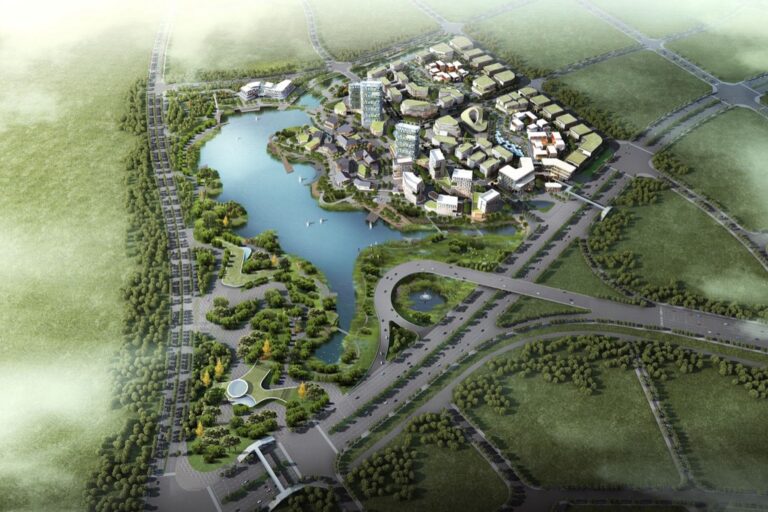
Building on the terrain visualization techniques discussed earlier, three-dimensional building representations transform urban planning maps into powerful decision-making tools. You’ll create comprehensive city models that communicate development patterns and spatial relationships with unprecedented clarity.
Showcasing Skyline Profiles and City Density
Establish building height hierarchies using graduated 3D extrusion techniques that instantly communicate density patterns across urban zones. You’ll implement proportional scaling where building height directly correlates to actual structure measurements, creating authentic skyline profiles that planners can evaluate at a glance. Configure your GIS software to render buildings with consistent height-to-footprint ratios, ensuring visual accuracy while maintaining map readability. This approach enables immediate identification of high-density corridors and potential development opportunities through clear vertical differentiation.
Differentiating Residential, Commercial, and Industrial Zones
Apply distinct architectural styling to building representations using color coding, roof geometry, and structural patterns that immediately distinguish zoning categories. You’ll configure residential areas with peaked roof profiles and earth-tone colors, while commercial zones feature flat-topped structures in neutral grays and blues. Industrial zones display larger footprints with metallic textures and simplified geometric forms. This visual differentiation system allows planners to quickly assess zoning compliance and identify mixed-use opportunities without consulting separate overlay maps or attribute tables.
Integrating Architectural Details for Scale Reference
Incorporate recognizable building features like windows, doors, and structural elements that provide immediate scale context for planning assessments. You’ll add these details using texture mapping and procedural modeling techniques that maintain visual consistency across different zoom levels. Focus on prominent landmarks and civic buildings with enhanced architectural detail to establish reference points throughout your urban model. This detailed approach helps stakeholders understand proposed development impacts by providing familiar visual anchors that communicate actual building sizes and neighborhood character effectively.
Developing Interactive Navigation Systems Using Raised Landmark Symbols
[lasso id=”16697″]
Interactive navigation systems benefit significantly from three-dimensional landmark symbols that create intuitive wayfinding experiences. These raised elements transform traditional maps into engaging navigation tools that users can quickly interpret and follow.
Highlighting Major Transportation Hubs
Transportation hubs require distinctive 3D symbols that immediately communicate their function and importance within your navigation system. Airports benefit from elevated terminal structures with recognizable architectural features, while train stations use raised platform configurations that mirror their actual layouts. Bus terminals gain clarity through multi-level canopy representations that show passenger flow patterns. You’ll want to scale these symbols proportionally to their real-world significance, ensuring major international airports appear more prominent than regional transit centers. Ferry terminals work best with pier-like extensions that indicate water connections and departure points for maritime routes.
Emphasizing Cultural and Historical Points of Interest
Cultural landmarks demand specialized 3D representations that capture their unique architectural characteristics and historical significance. Museums benefit from distinctive building profiles that reflect their actual facades, while monuments use graduated height scaling to show their relative importance. Historic districts gain depth through period-appropriate architectural styling that distinguishes them from modern developments. Religious sites require respectful symbolic representation through simplified spire, dome, or tower configurations. You should incorporate texture mapping on these cultural symbols to provide visual context without overwhelming the navigation interface, ensuring users can quickly identify destinations of interest.
Creating Memorable Wayfinding Experiences
Memorable navigation experiences emerge from consistent 3D symbol hierarchies that guide users through logical spatial sequences. Primary waypoints use the tallest symbol heights with distinctive colors, while secondary markers employ medium elevation with complementary tones. Directional flow benefits from graduated symbol positioning that creates visual pathways between major destinations. You’ll achieve optimal results by implementing progressive disclosure techniques, where symbol detail increases as users zoom into specific areas. Interactive elements like hover states and click animations enhance user engagement while maintaining cartographic integrity through standardized symbol libraries and consistent scaling ratios.
Advancing Environmental Mapping Through Volumetric Forest and Water Features
[lasso id=”16210″]
Environmental mapping reaches new levels of precision when you integrate volumetric 3D symbols to represent natural features. These dimensional representations transform abstract ecological data into intuitive visual narratives that support conservation planning and resource management decisions.
Representing Canopy Density and Tree Heights
Canopy density visualization requires graduated 3D tree symbols that correlate with actual forest measurements. You’ll achieve accurate representations by importing LiDAR point cloud data into QGIS 3D View or ArcGIS Pro’s Voxel Layer functionality. Create varying symbol heights from 5-50 meters based on field measurements, while adjusting transparency levels from 30-80% to represent canopy coverage percentages. Implement green color gradients from light sage (#9CAF88) for sparse coverage to deep forest green (#2D5016) for dense canopies, ensuring your symbols maintain consistent proportional scaling across different zoom levels for effective environmental assessment.
Illustrating Water Body Depth and Flow Direction
Water depth representation utilizes graduated blue 3D polygons with inverted extrusion to show underwater topography effectively. You’ll create depth variations using bathymetric data in Global Mapper or ArcGIS Maritime, extruding water surfaces downward from 1-100 meters based on actual measurements. Implement directional arrow symbols along waterways using animated flow vectors in QGIS Temporal Controller, scaling arrow thickness from 2-8 pixels to represent flow velocity. Apply blue color gradients from light cyan (#B0E0E6) for shallow areas to navy blue (#000080) for deep water, while maintaining transparency settings at 60-70% to preserve underlying terrain visibility.
[lasso id=”16343″]
Showing Seasonal Vegetation Changes
Seasonal vegetation mapping employs time-based 3D symbol libraries that reflect phenological changes throughout the year. You’ll implement dynamic color palettes using NDVI satellite data in ENVI or Google Earth Engine, creating four distinct seasonal representations with varying green intensities. Spring symbols use light green (#90EE90) with 40% height, summer displays full green (#228B22) at 100% height, autumn shows mixed yellow-orange gradients (#FFD700 to #FF8C00) at 80% height, and winter represents dormant vegetation with brown tones (#8B4513) at 30% height. Configure temporal animations in ArcGIS Pro’s Time Slider to demonstrate vegetation cycles, ensuring smooth transitions between seasonal states for comprehensive environmental analysis.
Transforming Educational Materials with Tactile Geographic Elements
Educational cartography benefits significantly from incorporating 3D symbols that create physical learning experiences. These tactile elements bridge the gap between abstract geographic concepts and concrete understanding.
Supporting Visually Impaired Learning Through Touch
Raised relief maps provide essential spatial information through tactile exploration for visually impaired students. You’ll need to extrude contour lines at 2-3mm heights using specialized 3D printing techniques or thermoforming processes. Braille labeling integration works best when positioned consistently at the northeast corner of each geographic feature. Professional tactile mapping software like ViewPlus Tiger produces standardized raised symbols that meet ADA accessibility requirements. Consider varying texture patterns – smooth surfaces for water bodies, rough textures for mountainous regions, and crosshatched patterns for urban areas.
[lasso id=”7259″]
Engaging Students with Hands-On Exploration
Interactive 3D models transform passive map reading into active geographic discovery experiences. You can create modular terrain pieces using foam board construction or 3D-printed components that students manipulate during lessons. Stackable elevation layers demonstrate concepts like watersheds and drainage basins when students physically remove and reposition different topographic levels. Magnetic base systems allow quick reconfiguration of geographic features. Scale these models at 1:50,000 for classroom use, ensuring features remain proportionally accurate while maintaining educational clarity through simplified geometric shapes.
[lasso id=”5547″]
Reinforcing Spatial Reasoning Skills
Graduated symbol manipulation develops critical spatial analysis abilities through hands-on geographic problem solving. Students practice scale relationships by comparing different sized 3D population pyramids or economic indicators across regions. Coordinate system understanding improves when students physically place 3D markers using GPS coordinates on large-format base maps. Assembly exercises using interlocking 3D watershed models teach students how geographic systems connect across landscapes. These activities strengthen mental mapping skills while building confidence with spatial measurement concepts essential for advanced geographic analysis.
[lasso id=”16393″]
Revolutionizing Disaster Management Maps with Three-Dimensional Risk Visualization
Three-dimensional risk visualization transforms emergency planning by converting abstract hazard data into compelling visual narratives that emergency responders can immediately understand and act upon.
Modeling Flood Zones and Water Level Projections
Modeling flood zones requires graduated 3D polygons that represent water depth through vertical extrusion techniques. You’ll create realistic inundation scenarios using FEMA flood data combined with digital elevation models in ArcGIS Pro’s 3D Analyst extension. Apply transparency gradients to show progressive flood stages, with darker blue indicating deeper water levels. Incorporate animated flow vectors to demonstrate water movement patterns during different storm intensities. These volumetric representations help emergency planners visualize evacuation timing and identify critical infrastructure vulnerabilities across flood-prone communities.
Representing Earthquake Fault Lines and Seismic Activity
Representing earthquake fault lines involves creating raised 3D linear symbols that correlate with historical seismic activity levels. You’ll implement graduated thickness variations based on fault displacement measurements, using red-to-orange color ramps for active fault systems. Integrate 3D epicenter spheres scaled to magnitude values, creating temporal animations that show earthquake sequences over time. Apply vertical exaggeration techniques to emphasize fault scarps and geological displacement patterns. These three-dimensional fault visualizations enable seismic risk assessment teams to identify high-priority zones for building code enforcement and emergency preparedness initiatives.
Illustrating Evacuation Routes and Emergency Shelters
Illustrating evacuation routes demands distinctive 3D corridor symbols that maintain visibility during crisis situations. You’ll design elevated pathway markers using bright green 3D arrows with consistent spacing intervals, ensuring route clarity across various map scales. Create specialized 3D shelter symbols with proportional sizing based on capacity data, incorporating accessibility indicators for disabled populations. Implement real-time traffic flow integration through animated 3D vectors that show congestion patterns during evacuation scenarios. These three-dimensional navigation aids provide emergency coordinators with clear visual frameworks for directing population movements and resource allocation during disaster response operations.
Creating Immersive Tourism Maps with Dimensional Attraction Symbols
Tourism cartography transforms ordinary destination maps into compelling visual experiences that entice visitors while providing essential navigation guidance. Three-dimensional attraction symbols create memorable impressions that help tourists visualize their journey before arrival.
Showcasing Natural Wonders and Scenic Viewpoints
Design elevated landmark symbols that capture the distinctive character of natural attractions using proportional scaling based on visitor significance. Mount Rushmore requires towering 3D presidential profiles while waterfalls need cascading blue gradients with height variations. Implement viewpoint symbols with directional 3D arrows and graduated visibility cones that show optimal viewing angles and distances. Create topographic integration where natural wonders emerge naturally from terrain surfaces using ArcGIS Pro’s 3D symbology tools for seamless visual flow.
Highlighting Accommodation and Dining Options
Establish accommodation hierarchies through graduated 3D building symbols that reflect star ratings and capacity using height-based visual coding systems. Luxury resorts receive prominent tower symbols while boutique hotels use distinctive architectural 3D models. Design dining category symbols with specialized 3D icons representing cuisine types—rotating chef hats for fine dining and scaled outdoor seating for casual establishments. Implement density clustering that groups accommodation options using 3D proximity zones while maintaining individual property visibility through selective symbol highlighting.
Providing Virtual Preview Experiences
Develop interactive 3D flythrough sequences that connect major attractions using automated camera paths in ESRI CityEngine or similar platforms. Tourists experience realistic previews of scenic routes and landmark approaches before visiting physical locations. Create seasonal symbol variations that showcase attractions across different times of year using time-enabled 3D layers with weather-appropriate texturing. Integrate augmented reality markers with QR-enabled 3D symbols that trigger mobile device overlays containing additional photos, reviews, and booking information for enhanced pre-visit planning.
Conclusion
These seven innovative approaches to 3D cartographic symbols offer you powerful tools to transform traditional flat maps into engaging visual experiences. Whether you’re working with terrain visualization urban planning navigation systems environmental data educational materials disaster management or tourism promotion each technique opens new possibilities for effective spatial communication.
The key to successful 3D symbol implementation lies in balancing visual appeal with functional clarity. You’ll find that graduated heights transparent layers and consistent symbol hierarchies work together to create maps that not only capture attention but also communicate complex spatial relationships with remarkable precision.
As mapping technology continues to evolve your ability to integrate these dimensional elements will become increasingly valuable. Start experimenting with these techniques today and you’ll discover how 3D symbols can elevate your cartographic work from simple navigation tools to compelling storytelling platforms that truly engage your audience.
Frequently Asked Questions
What are 3D symbols in mapping and why are they important?
3D symbols are three-dimensional elements integrated into traditional maps to provide depth and enhance visual storytelling. They transform flat, abstract data into intuitive visual narratives that clearly communicate complex spatial relationships like elevation changes, building heights, and population density, making maps more engaging and informative for users.
Which software tools are commonly used for creating 3D mapping symbols?
ArcGIS Pro with its 3D Analyst extension is frequently mentioned as a primary tool for creating realistic terrain surfaces and 3D mapping elements. The article also references specialized 3D printing techniques for tactile maps and various interactive mapping platforms that support volumetric symbol integration.
How do 3D symbols improve urban planning maps?
3D symbols enhance urban planning by creating comprehensive city models that showcase skyline profiles, building heights, and development patterns. They use graduated 3D extrusion methods correlated with actual measurements and differentiate zones through distinct architectural styles and color coding, helping planners assess zoning compliance more effectively.
What role do 3D symbols play in environmental mapping?
In environmental mapping, 3D symbols transform abstract ecological data into visual narratives that support conservation planning. They visualize canopy density using LiDAR data, represent water body depth through graduated blue polygons, and show seasonal vegetation changes with time-based symbol libraries for comprehensive environmental analysis.
How do 3D mapping symbols benefit educational cartography?
3D symbols create tactile learning experiences, especially for visually impaired students through raised relief maps with Braille labeling. They transform passive map reading into active geographic discovery, engage students through hands-on exploration with interactive models, and reinforce spatial reasoning skills through graduated symbol manipulation exercises.
What advantages do 3D symbols offer for disaster management mapping?
3D symbols revolutionize disaster management by converting abstract hazard data into compelling visual narratives. They model flood zones with graduated polygons showing water depth, represent earthquake fault lines with raised symbols reflecting seismic activity, and create distinctive evacuation route corridors for clearer emergency planning and response.
How can 3D symbols enhance tourism maps?
3D symbols transform ordinary destination maps into compelling visual experiences that entice visitors. They showcase natural wonders through elevated landmark symbols, represent accommodation options via graduated building symbols, and provide virtual preview experiences using interactive flythrough sequences and augmented reality markers for enhanced pre-visit planning.