7 Best 3D Modeling Techniques for Digital Maps
The big picture: Traditional flat maps can’t capture the full complexity of our three-dimensional world, but advanced 3D modeling techniques are revolutionizing how you create and interact with geographic data.
Why it matters: Modern cartographers are combining cutting-edge 3D technology with mapping expertise to produce stunning visualizations that reveal terrain details, urban landscapes, and spatial relationships impossible to show on traditional 2D maps.
What’s next: These seven proven techniques will transform your mapping projects from basic representations into immersive, data-rich experiences that engage audiences and communicate geographic information with unprecedented clarity.
Disclosure: As an Amazon Associate, this site earns from qualifying purchases. Thank you!
P.S. check out Udemy’s GIS, Mapping & Remote Sensing courses on sale here…
Understanding The Fundamentals Of 3D Modeling In Modern Cartography
3D modeling transforms geographic data into three-dimensional representations that capture elevation, depth, and spatial relationships with unprecedented accuracy. You’ll work with digital elevation models (DEMs) as your foundation, combining height data with geographic coordinates to build realistic terrain surfaces.
[lasso id=”16024″]
Your 3D cartographic workflow relies on point cloud data, vector geometries, and raster datasets working together. LiDAR scanning provides precise elevation measurements while photogrammetry techniques extract 3D information from overlapping aerial photographs. Software like ArcGIS Pro, QGIS, and Blender handle these complex datasets efficiently.
Coordinate systems become critical when you’re integrating multiple data sources into cohesive 3D models. You’ll need to ensure all datasets share the same spatial reference system to prevent alignment errors that compromise your final visualization.
The rendering process converts your raw geographic data into visual 3D models through mesh generation, texture mapping, and lighting calculations. Modern GPUs accelerate these computations, allowing you to work with larger datasets and achieve real-time visualization capabilities for interactive mapping applications.
Technique 1: Digital Elevation Model (DEM) Integration For Terrain Visualization
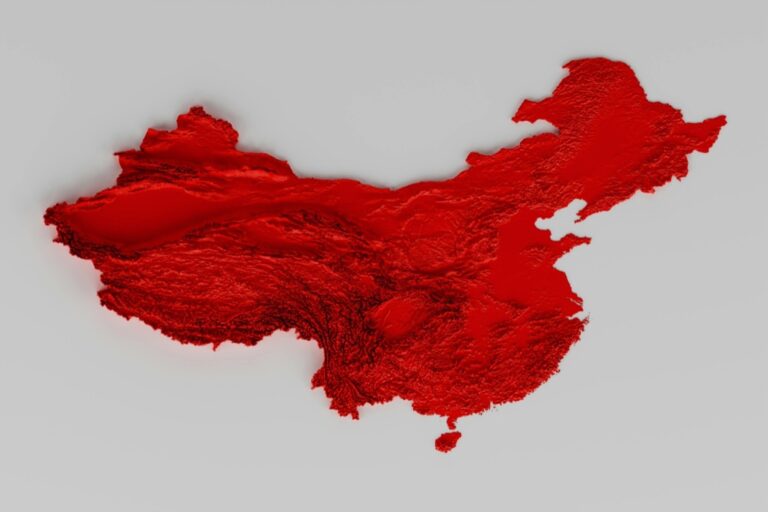
Digital Elevation Model integration forms the cornerstone of effective 3D terrain visualization in modern cartography. You’ll transform flat geographic data into compelling three-dimensional landscapes that reveal elevation patterns and topographic relationships invisible in traditional 2D maps.
Creating Accurate Topographic Representations
Precise elevation data forms the foundation of realistic terrain models. You’ll need to interpolate elevation values between known points using algorithms like Inverse Distance Weighting (IDW) or kriging to create smooth surface transitions. Grid-based DEMs typically use 30-meter or 10-meter resolution cells, with each cell containing an elevation value that represents the average height within that area. Quality topographic representations require careful attention to vertical datum consistency and proper handling of data gaps or anomalies in your source elevation datasets.
Processing LiDAR And Satellite Data Sources
LiDAR point clouds provide the highest accuracy for elevation modeling projects. You’ll process millions of laser return points using software like ArcGIS Pro or QGIS to filter ground returns from vegetation and structures. Satellite-derived elevation data from SRTM or ASTER missions offers global coverage at 30-meter resolution, making it ideal for large-scale projects. Processing workflows typically involve noise reduction, outlier removal, and classification of point returns to distinguish bare earth from surface features like buildings or tree canopy.
Optimizing Resolution For Different Map Scales
Resolution selection directly impacts both visual quality and processing performance in your mapping projects. You’ll use 1-meter DEMs for detailed site analysis and urban planning applications, while 30-meter resolution works effectively for regional watershed studies or geological mapping. Large-scale topographic maps benefit from 10-meter DEMs that balance detail with manageable file sizes. Consider your final output scale when choosing resolution – a 1:24,000 scale map doesn’t require sub-meter elevation data, while engineering applications demand the highest available resolution for accurate volume calculations and slope analysis.
[lasso id=”16313″]
Technique 2: Photogrammetry Applications For Real-World Feature Mapping
Photogrammetry transforms ordinary photographs into precise 3D measurements and models for cartographic applications. You’ll extract dimensional data from overlapping images to create detailed terrain surfaces and feature representations that complement traditional survey methods.
Aerial Photography Processing Workflows
Drone-based photogrammetry workflows require systematic flight planning with 70-80% image overlap for optimal results. You’ll process raw imagery through structure-from-motion (SfM) algorithms using software like Agisoft Metashape or Pix4D to generate point clouds and orthomosaics. Ground control points enhance geometric accuracy to within 2-5 centimeters for mapping applications. Processing typically involves image alignment, dense cloud generation, mesh creation, and texture mapping stages that transform hundreds of photographs into measurable 3D datasets.
[lasso id=”17207″]
Ground-Based Image Capture Methods
Terrestrial photogrammetry techniques utilize handheld cameras or tripod-mounted systems to capture detailed building facades and vertical features. You’ll establish convergent imaging networks with multiple viewpoints around your subject to ensure complete coverage and geometric strength. Close-range photogrammetry excels at documenting architectural details, rock formations, and infrastructure elements that aerial methods cannot adequately capture. Proper camera calibration and systematic image acquisition patterns are essential for achieving millimeter-level accuracy in your final 3D models.
Quality Control And Accuracy Assessment
Accuracy validation procedures compare photogrammetric results against independent survey measurements or known reference points. You’ll calculate root mean square error (RMSE) values to quantify positional accuracy and identify systematic errors in your datasets. Check point analysis using 10-20% of your ground control points provides statistical confidence in model reliability. Visual inspection of point cloud density, mesh topology, and texture quality reveals processing artifacts that could compromise cartographic applications requiring high geometric fidelity.
Technique 3: Building Information Modeling (BIM) Integration For Urban Planning
BIM integration transforms traditional urban mapping by incorporating detailed architectural and infrastructure data into comprehensive 3D cartographic systems. This technique enables precise visualization of building relationships, utility networks, and spatial planning scenarios.
Importing Architectural Data Into Cartographic Systems
Converting BIM models into cartographic formats requires standardized data exchange protocols like IFC (Industry Foundation Classes) and CityGML. You’ll extract geometric primitives from Autodesk Revit or Bentley MicroStation files, then transform building elements into simplified 3D representations. Software like FME or ArcGIS Data Interoperability handles coordinate system transformations while preserving semantic attributes. Clean topology ensures proper integration with existing GIS datasets, maintaining spatial accuracy throughout the conversion process.
Synchronizing Infrastructure Updates With Map Databases
Real-time synchronization between BIM systems and cartographic databases requires automated workflows using APIs and web services. You’ll establish bidirectional data connections through platforms like Esri’s ArcGIS Online or Autodesk Construction Cloud. Database triggers automatically update map representations when architects modify building designs or infrastructure engineers adjust utility layouts. Version control systems track changes across multiple data sources, ensuring map accuracy reflects current construction status and planned developments.
Managing Multi-Scale Representation Challenges
Multi-scale BIM visualization demands level-of-detail (LOD) hierarchies that adapt building complexity based on viewing distance and map scale. You’ll create generalized building footprints for regional views while preserving detailed facade elements for neighborhood-scale mapping. Automated simplification algorithms reduce polygon counts without losing critical geometric features. Performance optimization techniques include texture atlasing and mesh decimation, ensuring smooth navigation across scale transitions while maintaining visual coherence in your 3D urban models.
Technique 4: Point Cloud Data Processing For Comprehensive Spatial Analysis
Point cloud data processing enables cartographers to extract detailed spatial information from millions of 3D coordinate points, creating comprehensive analyses that support accurate terrain modeling and feature extraction. This technique bridges the gap between raw sensor data and actionable cartographic products.
Converting Raw Point Cloud Data To Usable Formats
Converting raw point cloud data requires specialized software to transform proprietary sensor formats into standardized file types like LAS, LAZ, or PLY. You’ll process ASCII text files containing XYZ coordinates through tools like CloudCompare or PDAL to create structured datasets with proper coordinate reference systems. Format conversion maintains point accuracy while adding essential metadata including RGB values, intensity measurements, and classification codes. Popular conversion workflows involve importing .las files into ArcGIS Pro or QGIS for further processing and analysis.
Filtering And Cleaning Techniques For Better Accuracy
Filtering point cloud data removes noise, outliers, and unwanted features to improve spatial analysis accuracy and visualization quality. You’ll apply statistical outlier removal algorithms that identify points beyond standard deviation thresholds, eliminating erroneous measurements from sensor interference or atmospheric conditions. Noise reduction filters enhance data quality by removing vegetation returns in ground classification workflows or eliminating low-confidence points based on intensity values. Advanced cleaning techniques include progressive morphological filters for separating ground points from above-ground features.
Integration With Traditional Vector Mapping Methods
Integration combines point cloud-derived features with existing vector datasets to create comprehensive spatial databases that leverage both data types’ strengths. You’ll extract building footprints from classified point clouds and merge them with cadastral polygons or road centerlines from traditional surveys. Hybrid workflows enhance mapping accuracy by using point cloud data for elevation attribution while maintaining vector topology for spatial relationships and feature connectivity. Cross-validation between point cloud measurements and vector geometries ensures consistency across different data sources and collection methods.
Technique 5: Virtual Reality (VR) And Augmented Reality (AR) Implementation
VR and AR technologies transform static 3D cartographic models into interactive environments that allow users to explore spatial data through immersive experiences. These implementations create new possibilities for understanding complex geographic relationships and spatial patterns.
Creating Immersive Cartographic Experiences
Immersive cartographic experiences transport users directly into 3D geographic environments where they can explore terrain features, urban landscapes, and spatial relationships at natural scale. You’ll create these experiences by converting your 3D mapping data into VR-compatible formats using engines like Unity 3D or Unreal Engine. Spatial presence becomes the key advantage as users navigate through mountain valleys, examine building interiors, or analyze flood zones from ground level. These immersive environments support collaborative planning sessions where multiple stakeholders can simultaneously explore proposed developments or environmental changes in shared virtual spaces.
Hardware Requirements And Software Compatibility
Hardware requirements vary significantly between VR headsets like Oculus Quest 2 ($299-399) and high-end systems like HTC Vive Pro 2 ($799-1399) that demand powerful graphics cards. You’ll need minimum specifications including Intel i5-8400 processors, NVIDIA GTX 1060 graphics cards, and 8GB RAM for basic VR mapping applications. Software compatibility focuses on game engines like Unity 3D with XR Toolkit or Unreal Engine 4/5 with VR templates that support direct integration of GIS data formats. AR implementations require mobile devices with ARCore (Android) or ARKit (iOS) capabilities, plus development platforms like Vuforia or 8th Wall for web-based experiences.
[lasso id=”16695″]
User Interface Design For 3D Navigation
User interface design for 3D navigation prioritizes intuitive spatial controls that minimize motion sickness while maximizing exploration efficiency. You’ll implement teleportation systems for VR environments that allow users to point and instantly move to desired locations rather than using traditional walking mechanics. Hand tracking and gesture controls replace traditional mouse and keyboard inputs, enabling natural interactions like grabbing terrain features or scaling map elements with pinch gestures. AR interfaces overlay contextual information directly onto real-world environments using spatial anchors that maintain position accuracy as users move through physical spaces, creating seamless integration between digital map data and reality.
Technique 6: Web-Based 3D Mapping Platforms And Interactive Visualization
Web-based 3D mapping platforms make your cartographic work accessible to broader audiences without requiring specialized software installations. You’ll transform complex spatial data into interactive visualizations that users can explore directly through their browsers.
Choosing The Right Development Frameworks
WebGL-based frameworks like Cesium and Three.js offer the most robust 3D mapping capabilities for browser deployment. Cesium excels at large-scale geospatial visualization with built-in terrain rendering and time-dynamic data support. Three.js provides greater customization flexibility but requires more development time for geographic coordinate handling. MapboxGL JS delivers excellent performance for urban-scale projects with vector tile integration. You’ll need to consider your project’s geographic scope and interactivity requirements when selecting frameworks.
Optimizing Performance For Browser-Based Applications
Level-of-detail (LOD) systems maintain smooth performance by adjusting model complexity based on viewing distance. You’ll implement tile-based loading to stream only visible data portions rather than loading entire datasets. Texture compression reduces bandwidth requirements while maintaining visual quality through formats like KTX2 or DDS. GPU memory management becomes critical – monitor your WebGL context limits and implement efficient buffer recycling. Consider using web workers for data processing tasks to prevent main thread blocking during intensive operations.
Cross-Platform Compatibility Considerations
WebGL 2.0 support varies across devices, requiring fallback strategies for older browsers and mobile platforms. You’ll need to test performance on low-power devices like tablets and smartphones where memory limitations affect model complexity. Progressive enhancement ensures basic functionality on all platforms while delivering advanced features to capable devices. Touch interface design differs significantly from desktop interactions – implement gesture controls for mobile navigation. Safari’s WebGL implementation has known limitations that may require specific workarounds for iOS compatibility.
[lasso id=”5695″]
Technique 7: Machine Learning And AI-Assisted 3D Feature Extraction
Machine learning algorithms revolutionize traditional feature extraction workflows by automatically identifying and classifying spatial objects within complex 3D cartographic datasets. You’ll find these AI-driven approaches particularly valuable when processing large-scale mapping projects that would otherwise require extensive manual digitization.
Automated Object Recognition In 3D Environments
Convolutional neural networks (CNNs) excel at detecting buildings, vegetation, and infrastructure elements within 3D point clouds and mesh models. Deep learning frameworks like TensorFlow and PyTorch enable you to train models that recognize specific cartographic features with accuracy rates exceeding 90% in urban environments. You can implement pre-trained models such as PointNet++ for point cloud classification or customize architectures for specialized mapping applications. These systems automatically segment complex 3D datasets into distinct feature classes, significantly reducing manual interpretation time while maintaining geometric precision standards required for professional cartographic workflows.
Training Models For Cartographic Feature Classification
Custom training datasets require carefully annotated 3D samples that represent the full range of features you’ll encounter in your mapping projects. You’ll need to prepare ground truth data by manually labeling representative samples of buildings, roads, vegetation, and terrain features within your specific geographic region. Active learning techniques help optimize training efficiency by identifying the most informative samples for model improvement. Transfer learning approaches allow you to adapt existing models trained on similar datasets, reducing computational requirements and training time. You should validate model performance using independent test datasets and assess accuracy metrics like precision, recall, and F1-scores to ensure reliable feature classification results.
Combining Human Expertise With Automated Processing
Hybrid workflows that integrate AI-generated results with expert cartographic review deliver the highest quality 3D mapping outputs. You can establish quality control procedures where automated feature extraction provides initial classifications that undergo systematic review by experienced cartographers. Interactive editing tools allow you to refine AI-generated boundaries and correct misclassified features while preserving the efficiency gains of automated processing. Confidence scoring systems help prioritize areas requiring human attention, focusing your expertise on complex or ambiguous features. This collaborative approach maintains cartographic standards while leveraging machine learning capabilities to accelerate production timelines and reduce repetitive manual tasks in large-scale 3D mapping projects.
Conclusion
These seven 3D modeling techniques represent a fundamental shift in how you can approach modern cartography. By implementing these methods you’ll create more engaging and informative mapping experiences that resonate with your audience.
The integration of advanced technologies like AI machine learning VR/AR and web-based platforms opens new possibilities for spatial data visualization. You’re no longer limited by traditional flat representations when these tools allow you to capture the full complexity of geographic environments.
Success in 3D cartography requires selecting the right combination of techniques for your specific project goals. Whether you’re working with urban planning data or natural terrain features these methods provide the foundation for creating compelling three-dimensional maps that truly bring geographic information to life.
Frequently Asked Questions
What are the main limitations of traditional flat maps compared to 3D mapping?
Traditional flat maps struggle to accurately represent our three-dimensional world, failing to convey elevation, depth, and complex spatial relationships. They cannot show terrain features, urban environments, or architectural details that are essential for comprehensive geographic understanding. 3D mapping overcomes these limitations by providing immersive visualizations that capture the true complexity of geographic spaces.
How do Digital Elevation Models (DEMs) work in 3D cartography?
DEMs serve as the foundation for 3D terrain visualization by providing grid-based elevation data at varying resolutions. They interpolate elevation values from sources like LiDAR and satellite data to create accurate topographic representations. The choice of resolution impacts both visual quality and processing performance, making optimization crucial for different map scales.
What is photogrammetry and how does it enhance mapping projects?
Photogrammetry transforms ordinary photographs into precise 3D measurements and models. It uses aerial photography workflows with systematic flight planning and specialized software like Agisoft Metashape to process images into point clouds and orthomosaics. Ground-based image capture complements aerial methods by documenting detailed features that may be missed from above.
How does Building Information Modeling (BIM) integration benefit urban planning?
BIM integration transforms urban mapping by incorporating detailed architectural and infrastructure data into comprehensive 3D cartographic systems. It enables precise visualization of building relationships and utility networks through standardized data exchange protocols. Real-time synchronization between BIM systems and map databases creates automated workflows for updated urban models.
What are point clouds and how are they processed for mapping?
Point clouds consist of millions of 3D coordinate points that provide detailed spatial information for terrain modeling and feature extraction. Processing involves converting raw data into standardized formats, filtering and cleaning for accuracy, and integrating with traditional vector mapping methods. Specialized software maintains point accuracy while adding essential metadata.
How do VR and AR technologies enhance 3D mapping experiences?
VR and AR transform static 3D cartographic models into interactive environments, allowing immersive exploration of spatial data. VR creates fully immersive experiences using engines like Unity 3D, while AR overlays digital information onto real-world environments. Both technologies require intuitive user interface design and compatible hardware for optimal user experiences.
What advantages do web-based 3D mapping platforms offer?
Web-based 3D mapping platforms make cartographic work accessible to broader audiences without specialized software installations. They use WebGL-based frameworks like Cesium and Three.js for browser compatibility. Performance optimization techniques like level-of-detail systems and tile-based loading ensure smooth operation across various devices and browsers.
How does machine learning improve 3D feature extraction in mapping?
Machine learning algorithms automate feature identification and classification within complex 3D datasets using convolutional neural networks (CNNs). They can detect buildings, vegetation, and other features in 3D point clouds with high accuracy. Hybrid workflows combine AI-generated results with expert cartographic review to maintain quality while improving efficiency in large-scale projects.